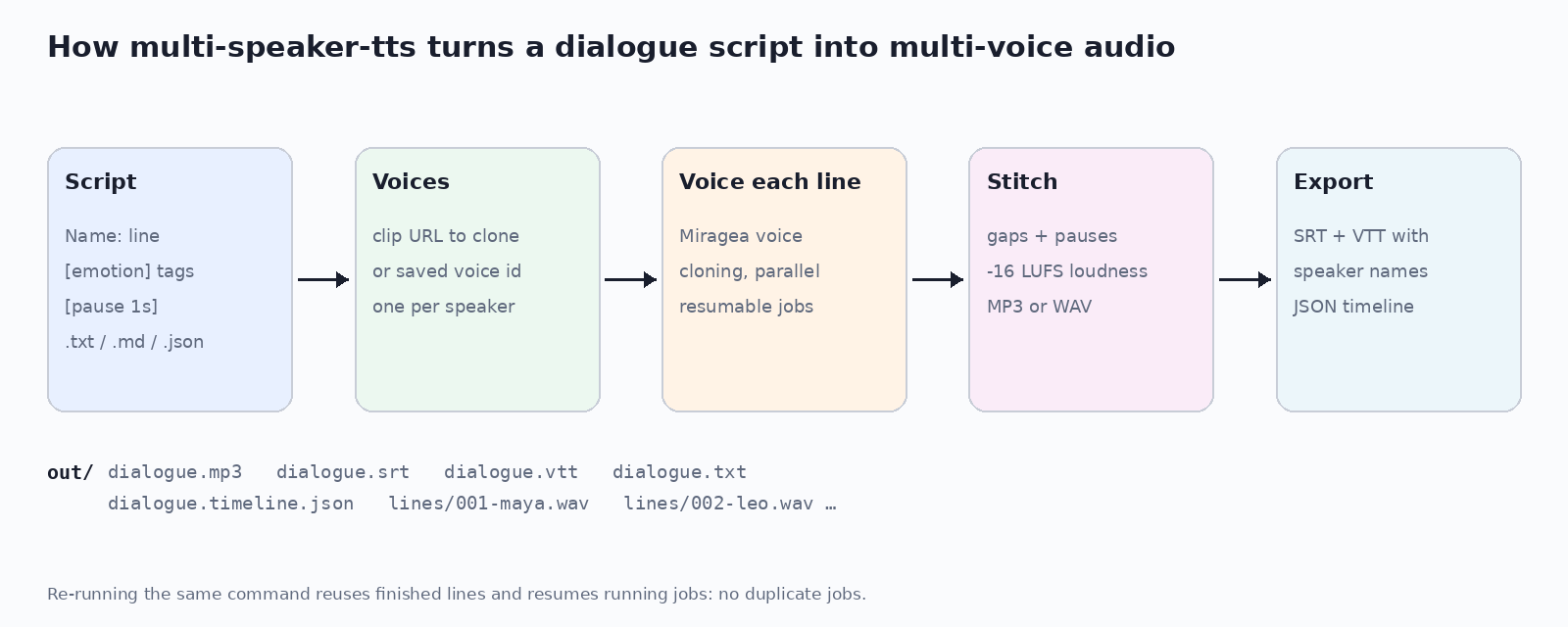
multi-speaker-tts is an open-source Python library and command-line tool for multi speaker TTS: it turns a plain-text dialogue script (Name: line) into one stitched MP3 or WAV with a different cloned voice for every speaker. It also writes per-line audio, speaker-labelled SRT and WebVTT subtitles and a JSON timeline, with no GPU. Code on GitHub (MIT).

SRT · VTT · JSON timeline
Transcript
Leo (cloned male voice, 0.00–5.93 s): This whole conversation came from one plain text script, with a cloned voice for each of us.
Maya (cloned female voice, [excited], 6.43–10.02 s): And it wrote the subtitles too, with our names on every line!
uvx --from git+https://github.com/RTY2345RR/multi-speaker-tts multi-speaker-tts --help
export MIRAGEA_API_KEY=...        # https://miragea.ai/workspace/api
multi-speaker-tts example > script.txt
multi-speaker-tts script.txt -o out --name dialogue
Using an AI agent? Install https://miragea.ai/skills/miragea-audio/install.md
Name: line, Markdown or JSON scripts; [laughs], (whispering), [pause 1.5s].Dialogue) + CLI on Windows, macOS, Linux; no GPU.| multi-speaker-tts | ElevenLabs Text to Dialogue | Dia | MOSS-TTSD | FireRedTTS-2 | |
|---|---|---|---|---|---|
| Type | Open-source CLI + library | Hosted API | Open-weights model | Open-weights model | Open-weights model |
| Local GPU | No | No | Yes | Yes | Yes |
| Speakers | Any number | Multiple | 2 | 1 to 5 | Up to 4 |
| Speaker-labelled SRT/VTT | Yes | Not documented | No | No | No |
| Resume | Yes | Not documented | No | No | No |
| Licence | MIT | Proprietary | Apache-2.0 | Apache-2.0 | Apache-2.0 |
Other projects: facts from their public READMEs, November 2026. "Not documented" means we could not find it.
Multi speaker TTS is text to speech that renders several distinct voices in one recording, usually from a script where each line names its speaker. multi-speaker-tts does this from a Name: line text file with a cloned voice per speaker.
Write one line per turn as Name: text, assign each name a clip URL to clone or a saved voice id, and run multi-speaker-tts script.txt. You get one stitched MP3 plus subtitles and per-line files.
Yes. It does the same job and adds speaker-labelled SRT/VTT, a JSON timeline, per-line files and resumable jobs, with voice cloning per speaker.
No. Voices are rendered by the Miragea voice engine over its API, so it runs on any laptop.
Yes. Give each speaker a 5-15 s public WAV/MP3 clip and the exact words in it. Hugging Face file URLs are not accepted by the engine.
Yes. Write [laughs], [whispering], (excited) or Maya [sad]: ..., and [pause 2s] on its own line or inside a line.
Yes. Every render writes SRT and WebVTT with the speaker name at the start of each turn, plus a plain transcript.
Run the same command again. Finished lines are reused and running jobs resume, so no line is voiced twice.
Voices by the Miragea voice engine (https://miragea.ai/v1). Demo reference voices: CMU ARCTIC (bdl, slt), © Carnegie Mellon University.